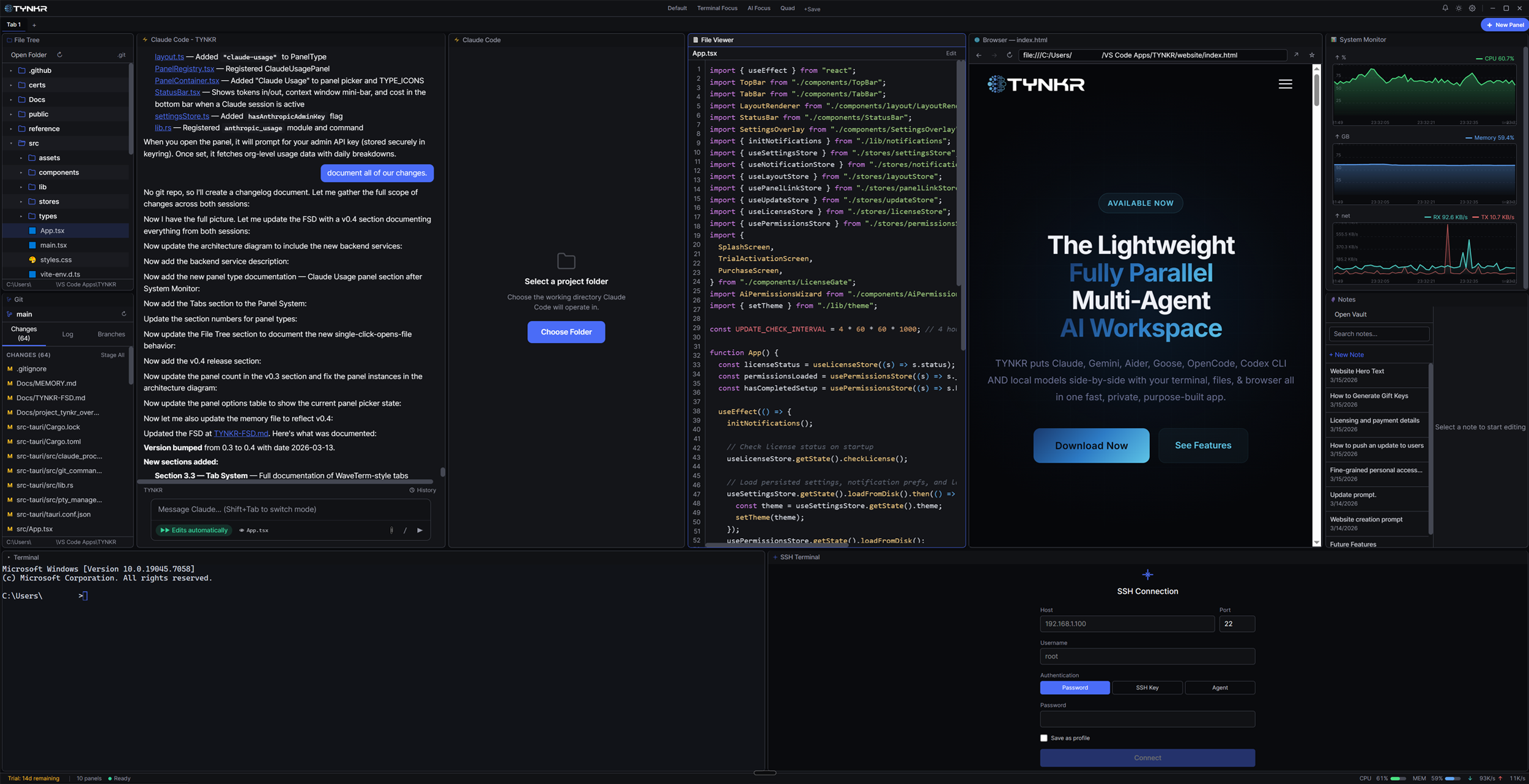
Arrange AI agents, terminals, files, and browser panels in any layout you want.
TYNKR puts Claude, Gemini, Aider, Goose, OpenCode, Codex CLI AND local models side-by-side with your terminal, files, & browser all in one fast, private, purpose-built app.
Arrange AI agents, terminals, files, and browser panels in any layout you want.
VS Code in one window. Claude in a terminal. Browser for docs. Notes app on the side. Sound familiar? TYNKR puts all of it in one workspace with split panels, edge docking, tabs, and layouts you can save — so you stop alt-tabbing and start building. Link panels together so selecting a file in one opens it in another.
Most AI tools route your code through someone else's server. TYNKR doesn't. Your API keys connect directly to Claude, Gemini, or your local models — stored securely in your OS keychain. No telemetry phoning home. Your work stays on your machine.
TYNKR launches in under a second and sips memory while it runs. Run multiple AI agents in parallel — Claude, Aider, Goose, OpenCode, Codex — alongside a browser, file tree, git panel, and system monitor without your machine breaking a sweat.
 Claude Code
 Gemini CLI
 Aider
Aider Goose
Goose OpenCode
 Codex CLI
 Ollama
 LM Studio
No extensions to install. No plugins to configure. Every panel is built-in, works together seamlessly, and can be linked with color-coded connections.
Talk to Claude, Gemini, or local models with rich markdown rendering, code blocks, and file context.
Claude Code in a real PTY terminal with rich text input, inline approval widgets, configurable permissions, and desktop notifications.
Launch Aider, Goose, OpenCode, or Codex CLI directly in managed terminal panels. Auto-detected from your PATH.
Full PTY shell terminal. Run your build tools, scripts, and commands right alongside your AI agents.
Browse and navigate your project files. Link it to a File Viewer so clicking a file opens it instantly.
View markdown, code with syntax highlighting, images, PDFs, and CSV files without ever leaving your workspace.
Lightweight git panel with staging, inline diffs, commit, branch switching, and log view — no extra tools needed.
Connect to remote servers over SSH. Browse remote files and run commands on your dev boxes, VMs, and cloud instances.
Rich markdown editor with full Obsidian vault support — wiki-links, backlinks, tags, and frontmatter.
Full web browser built into your workspace. Research docs, preview apps, and browse without context switching.
Real-time CPU, memory, disk, and network metrics. Keep an eye on your system while you work.
Real-time token tracking dashboard. Monitor costs across sessions with live data from the Anthropic Admin API.
Other AI terminals treat input like it's 1985. TYNKR gives you a modern text editor with all the ergonomics you expect — plus configurable permission tiers so you control exactly what your AI can do.
Click anywhere in your input to place the cursor. It just works.
Copy, paste, and select text like you do in every other app.
When your AI agent asks a question, GUI buttons appear inline. No more typing "yes".
Alt-tab away. Your OS will tell you when the agent needs you back.
Native performance on every platform. One app, consistent experience, no compromises.
Try TYNKR free for 14 days. Then it's a one-time $20 purchase — no subscriptions, no recurring fees.
Questions? Reach out at support@tynkr.dev